

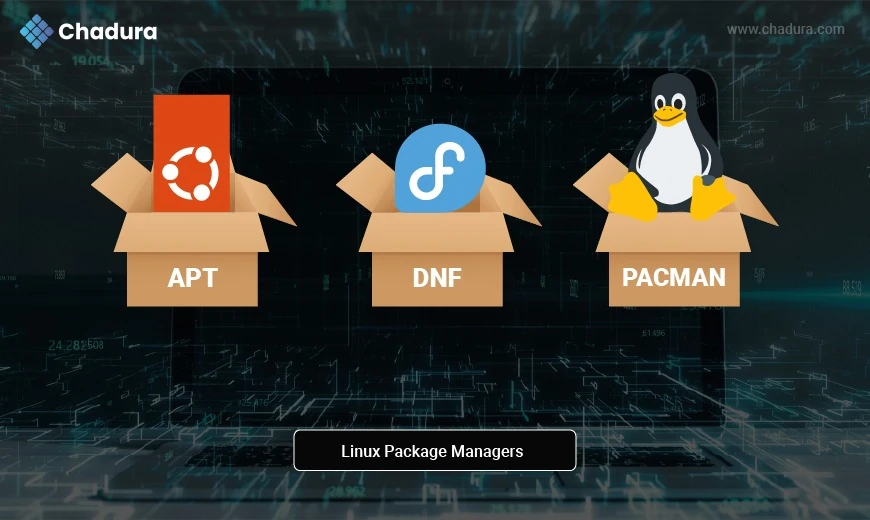
What Are Linux Package Managers?
In Linux, a package manager is a vital tool that automates the process of installing, updating, configuring, and removing software. Each Linux distribution (distro) typically uses a different package management system that fits its architecture, design philosophy, and user base.
Whether you're running Ubuntu, Fedora, Arch, or Gentoo, mastering the package manager for your system can dramatically improve your productivity, security, and system control.
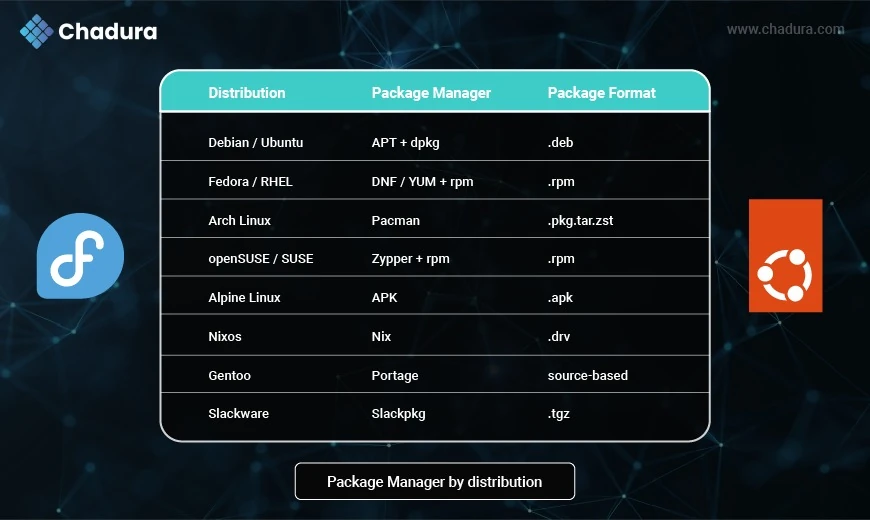
Package Managers by Distribution
Package manger working flow
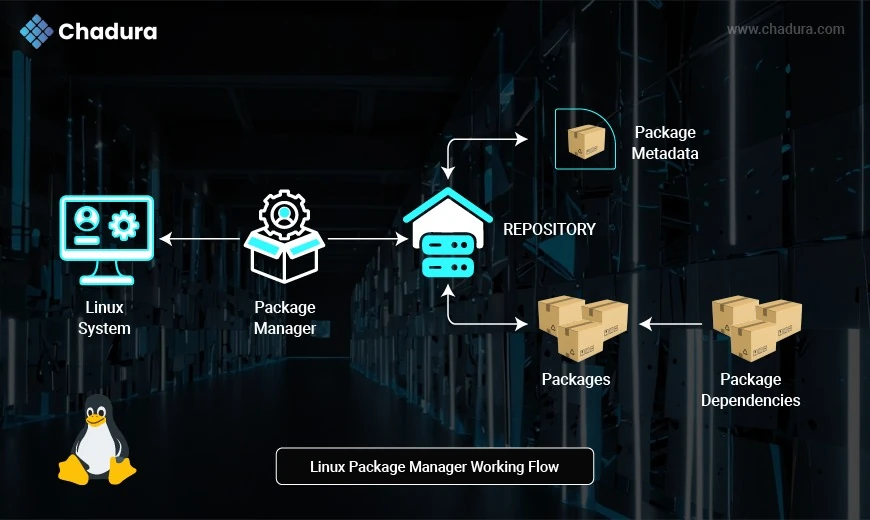
- Linux System (User)
This is you or any system administrator/developer who initiates a request to install, update, or remove software using a command like:
sudo apt install firefoxPackage Manager
The package manager (like apt, dnf, pacman, etc.) is the tool that handles:
- Sending the request to the software repository
- Downloading the necessary files
- Managing package versions
- Resolving dependencies The package manager is the heart of the whole process.
Repository
A repository is a central server (or mirror) that holds:
- Software packages
- Metadata (information about packages)
- Dependency lists
The package manager connects to the repo and requests the needed data.
Package Metadata
Metadata includes:
- Package version
- Description
- Author
- Dependency information
- File size
This allows the package manager to determine if a package is available, up-to-date, and what else it depends on.
Packages
Packages are the actual software bundles (e.g., .deb, .rpm, .pkg.tar.zst) that contain:
- Binaries
- Configuration files
- Docs
- Scripts for install/removal
These are what ultimately get installed on your system.
Package Dependencies
Dependencies are other packages required for a software to work. For example, installing a GUI app might require shared libraries, language runtimes, or system tools.
The package manager:
- Automatically fetches and installs these
- Ensures compatibility between them
Flow Summary
- You issue an install/update/remove command.
- The package manager contacts the repository.
- It fetches metadata to check details and compatibility.
- It downloads the main package along with all required dependencies.
- The software is installed on your Linux system.
Why This Flow Is Important
- Automation: Saves time and avoids manual dependency chasing.
- Security: Uses signed packages and official sources.
- Upgrades: Easily update all software with one command.
- Rollback (in some systems like zypper, nix): Revert broken installs.
APT (Advanced Package Tool) - Debian, Ubuntu, and derivatives
Features:
- Simple CLI (apt, apt-get)
- Dependency management
- Integration with .deb packages
- Fast repository syncing
Pros:
- Beginner-friendly
- Wide software availability
- Easy updates (sudo apt update && upgrade)
- Massive community support
Cons:
- Fragmented commands (apt, dpkg, apt-get)
- Can bloat over time without cleanup
DNF (Dandified Yum) - Fedora, RHEL 8+, AlmaLinux, Rocky Linux
Features:
- Advanced dependency resolution
- Module system support
- Plugin architecture
- RPM-based
Pros:
- Reliable and modular
- Strong repo management
- Faster than old yum
- Secure (GPG-verified)
Cons:
- Slightly steeper learning curve
- Newer users may miss apt-like simplicity
YUM (Yellowdog Updater Modified) - RHEL/CentOS 7
Features:
- Legacy RPM manager
- Dependency resolution
- Used on older enterprise systems
Pros:
- Time-tested
- Easy transition to DNF
Cons:
- Slower than DNF
- Deprecated in newer systems
RPM (RPM Package Manager) - Fedora, CentOS, openSUSE
Features:
- Low-level tool for .rpm files
- No dependency resolution
Pros:
- Powerful for manual package control
- Used across many RPM-based distros
Cons:
- Not user-friendly alone
- Must pair with DNF/YUM/Zypper for complete workflow
Zypper - openSUSE, SUSE Linux Enterprise
Features:
- Command-line tool for .rpm packages
- Interactive resolver
- Supports rollback with Btrfs & Snapper
Pros:
- Efficient dependency resolution
- Advanced rollback system
- Professional enterprise support
Cons:
- Less intuitive than APT
- Smaller community outside enterprise
Pacman - Arch Linux, Manjaro
Features:
- Simple syntax (pacman -Syu)
- Uses .pkg.tar.zst packages
- Fast and lean
Pros:
- Extremely lightweight
- Efficient and fast
- Centralized config files
Cons:
- Manual conflict resolution sometimes needed
- AUR requires helpers like yay for ease
APK - Alpine Linux
Features:
- Very small package size
- Ideal for containerized environments
- Super lightweight
Pros:
- Fastest of all managers
- Minimal footprint - ideal for Docker
- Secure and isolated
Cons:
- Limited GUI applications
- Learning curve for beginners
Nix - NixOS and Cross-distro
Features:
- Purely functional
- Rollback and reproducibility
- Isolation for packages
Pros:
- Great for CI/CD and development
- Never breaks the system
- Can run on any Linux distro
Cons:
- High learning curve
- Requires different mental model (functional)
Portage - Gentoo Linux
Features:
- Source-based package management
- USE flags for fine-grained customization
Pros:
- Absolute control over your system
- Optimized binaries for your hardware
Cons:
- Long compile times
- Not beginner-friendly
Slackpkg - Slackware
Features:
- Simple and Unix-style
- No auto dependency resolution
Pros:
- Transparent and lightweight
- Ideal for minimal systems
Cons:
- Requires manual dependency handling
- Not suited for modern app convenience
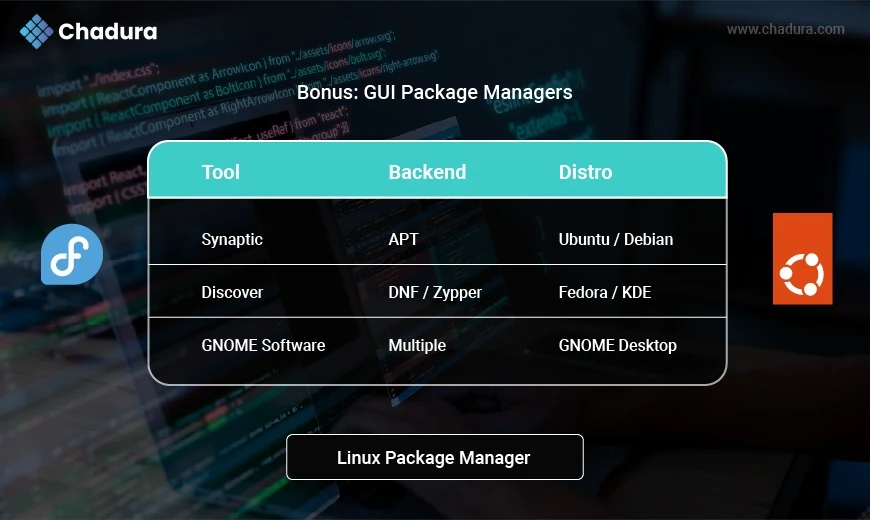
Bonus: GUI Package Managers
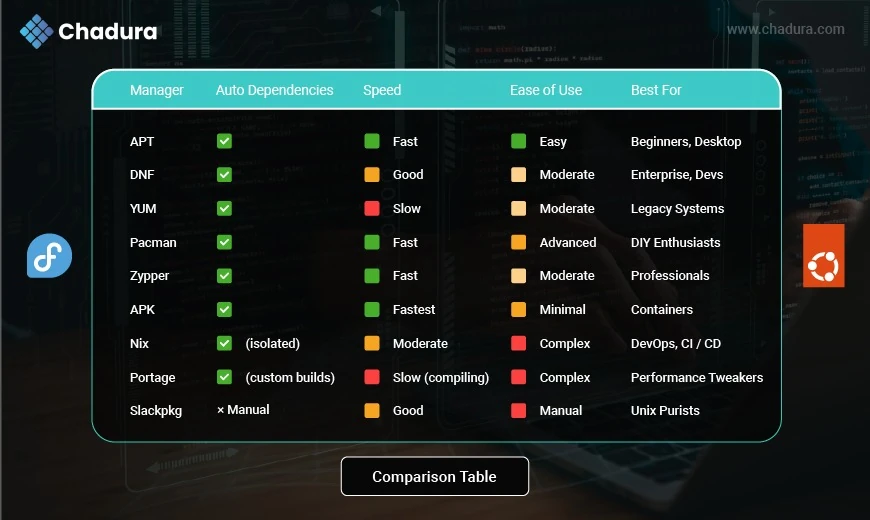
Comparison Table
Final Thoughts
Choosing the right package manager depends on your Linux distribution and use case. For general users, APT and DNF offer reliability and ease. Advanced users may prefer Pacman, Portage, or Nix for their flexibility, power, and control. In containerized environments, APK reigns supreme due to its small size and simplicity.