

Fedora Linux Architecture | Part - II | for Part -I
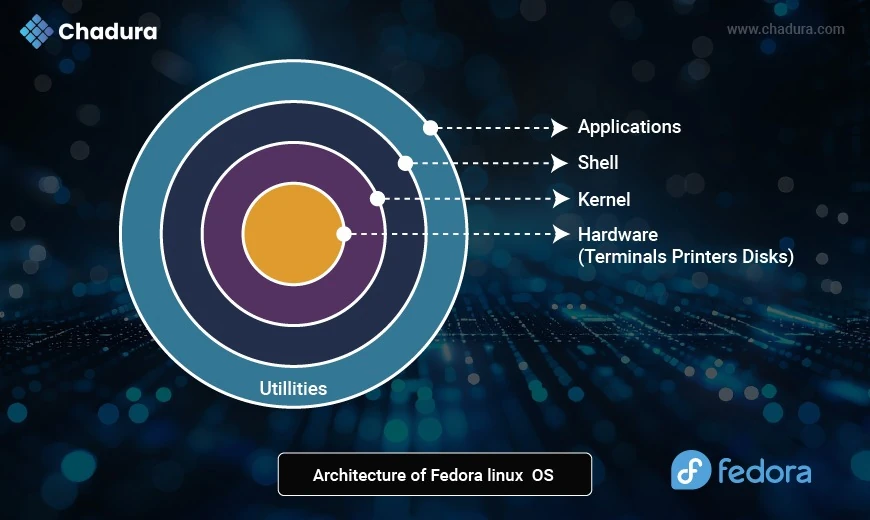
Hardware (Terminals, Printers, Disks)
- Core of the system - The physical layer.
- Includes all physical devices: CPU, RAM, printers, USB devices, storage, and display terminals.
Fedora interacts with these through drivers and firmware.
Kernel
- The heart of Fedora Linux.
- Acts as a bridge between hardware and software.
- Manages CPU scheduling, memory management, device I/O, file systems, and security (like SELinux).
- Fedora typically uses the latest stable Linux kernel, giving users access to modern hardware support and performance features.
Shell
- The user interface to the kernel.
- Provides command-line access (like Bash, Zsh) for interacting with system-level functions.
- Graphical shells (like GNOME Shell) also exist, built on top of system APIs.
In Fedora:
- Terminal-based shells enable scripting and system control.
- GNOME provides a powerful GUI shell in Fedora Workstation.
Applications
- Programs and tools that users interact with daily.
- Examples: Firefox, LibreOffice, GNOME Software, DNF package manager, Visual Studio Code.
Applications talk to the shell, which in turn communicates with the kernel for system-level actions.
Utilities (Outer Layer)
- System tools and libraries that support applications.
- Examples: systemd, firewalld, dnf, journalctl, and user-space utilities.
- These help with software management, logs, networking, system services, etc.
System Architecture and Technologies
Fedora integrates the latest system-level technologies, many of which are pioneered or adopted early by the Fedora Project.
Key Components:
- Systemd - Unified init system and service manager
- Wayland - Modern replacement for X11
- PipeWire - Replaces PulseAudio and JACK for audio/video
- Btrfs (Default file system since Fedora 33) - Supports snapshots and compression
- SELinux - Enforced mandatory access control
Security Features: SELinux and Beyond
Security is a major focus for Fedora. In fact, Fedora is often the first distro to adopt NSA-developed SELinux and related frameworks.
Fedora Security Stack:
- SELinux (Security-Enhanced Linux): Provides fine-grained control over processes and files.
- Firewalld: Easy-to-configure firewall daemon.
- AppArmor (optional): Available via installation for those who prefer it.
- RPM Signatures: Ensures package authenticity.
- Firmware Updates via LVFS: Secure hardware updates.
Comparison with Other Linux Distributions
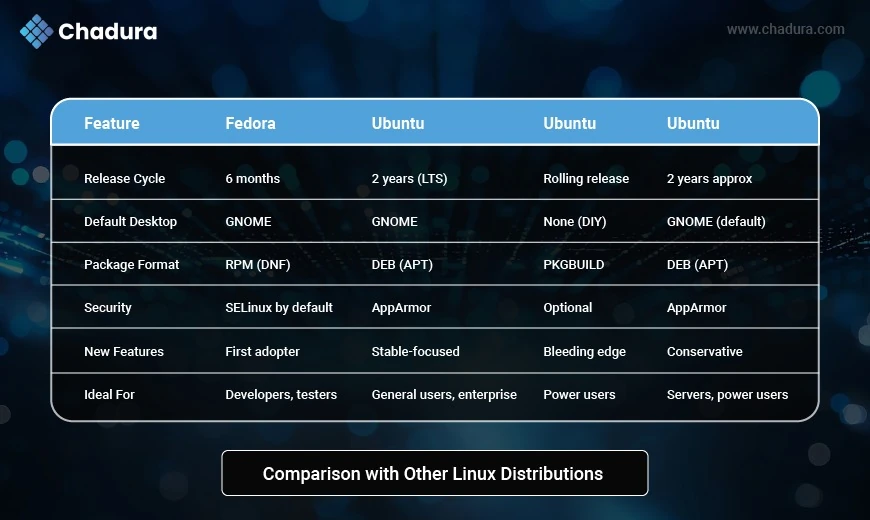
Key Differences
1. Philosophy
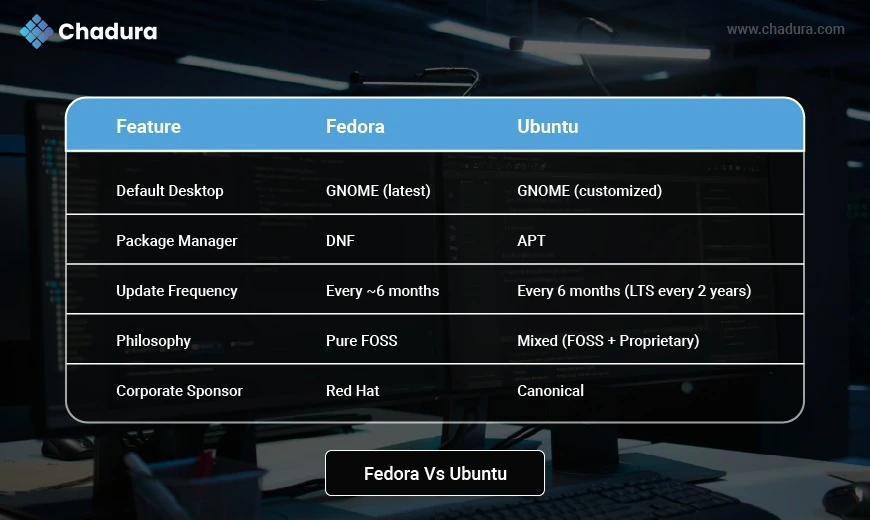
- Fedora aims to showcase the latest open-source technologies. It avoids shipping non-free/proprietary drivers by default.
- Ubuntu balances ease-of-use with functionality and includes proprietary drivers when necessary for better hardware compatibility.
2. Software Updates
- Fedora is on the bleeding edge, meaning faster access to the latest tools but potentially less stable.
- Ubuntu, especially the LTS (Long Term Support) versions, is more conservative and prioritizes stability.
3. Customization
- Fedora GNOME is closer to the upstream GNOME experience.
- Ubuntu GNOME includes Canonical's customizations, dock, and themes.
4. Community & Ecosystem
- Ubuntu has massive community support, more online tutorials, and larger market share.
- Fedora has a strong developer-centric community and is often used by contributors to the Linux kernel or GNOME.
Pros and Cons
Fedora Pros:
- Very up-to-date software
- Excellent for developers
- SELinux enabled by default
- Strong commitment to free software
Fedora Cons:
- Short support cycles (13 months)
- May need extra setup for proprietary drivers/codecs
- Smaller community for help
Fedora Vs Ubuntu
Ubuntu Pros:
- Easy to use and install
- LTS releases supported for 5 years
- Great community and documentation
- Supports both Snap and Flatpak
Ubuntu Cons:
- Snaps are controversial (slow, centralized)
- Custom GNOME may feel bloated
- Slightly slower access to new software
Pros and Cons of Fedora and Ubuntu
Pros
- Cutting-edge software
- Strong security model
- Developer-focused features
- Transparent community governance
- Container and Flatpak support
- Strong Red Hat backing
Cons
- Short life cycle (~13 months) - Requires more frequent upgrades
- Not ideal for users who want a stable base for 5+ years
- Fewer pre-installed apps than Ubuntu
- Some proprietary drivers (like NVIDIA) require manual setup
Conclusion
Fedora Linux is much more than just another distribution - it’s a platform for innovation, a community of creators, and a proving ground for the future of open-source computing. From bleeding-edge software and security features to robust development tooling and immutability, Fedora offers a uniquely modern experience backed by one of the strongest open-source communities in the world.
Whether you're a student exploring Linux, a developer building containerized applications, or an enterprise team looking for upstream technologies, Fedora has something to offer.