

Overview
Jenkins is an open-source automation server that enables developers to reliably build, test, and deploy software. It serves as the centerpiece of most DevOps toolchains and CI/CD pipelines. Originally developed as Hudson by Kohsuke Kawaguchi in 2004, Jenkins has evolved into the most widely adopted CI/CD automation tool in the world.
The Evolution of Jenkins
From Hudson to Jenkins
- 2004 : Hudson is developed at Sun Microsystems.
- 2011 : Due to trademark disputes with Oracle, the project forks into Jenkins.
- 2011 - 2025 : Jenkins becomes the de facto tool for automation in DevOps.
Why Jenkins Took Off
- Open source and highly extensible
- Huge community
- Over 1800+ plugins
- Quick adoption by enterprises
Jenkins Architecture
Jenkins has a simple yet powerful master-agent architecture:
Jenkins Controller (Master)
- Manages tasks like scheduling builds, sending out jobs, monitoring agents, reporting results, etc.
Jenkins Agent (Slave)
- Executes build jobs, tests, deployments, etc.
- Agents can run on different OSs, containers, or virtual machines.
Web UI
- Web-based user interface to configure jobs and view pipelines.
Build Executor
- The core that runs jobs concurrently (depending on system resources).
Security in Jenkins
Security is critical since Jenkins can access source code, secrets, servers, and more.
Jenkins Security Best Practices:
- Enable Matrix-Based Security
- Integrate with LDAP / SSO
- Use credentials plugin for storing secrets securely
- Install role-based authorization plugin
- Keep Jenkins and plugins up to date
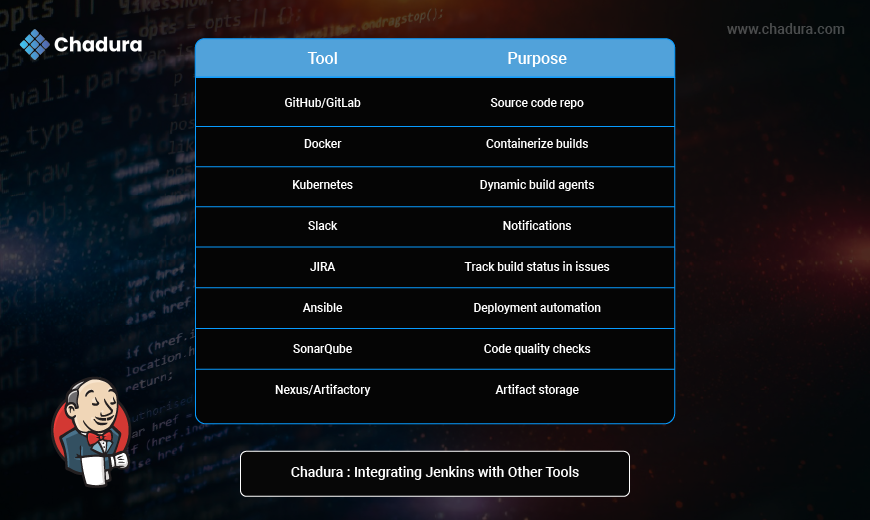
Integrating Jenkins with Other Tools
Scaling Jenkins
As teams grow, Jenkins needs to scale.
Tips for Scaling:
- Use Jenkins agents for parallelism
- Run agents on Kubernetes
- Separate jobs by workload using labels
- Use Pipeline as Code to reduce UI load
- Use folders and views to organize jobs
- Archive logs and artifacts externally
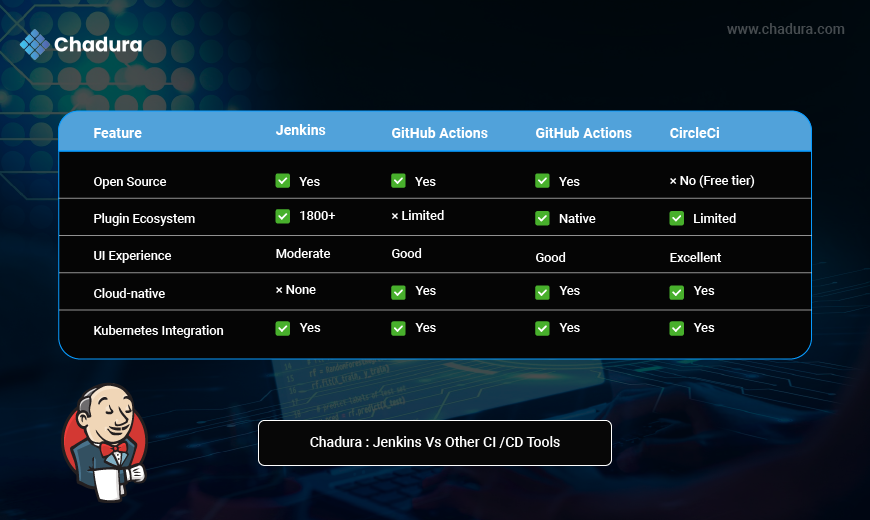
Jenkins vs Other CI/CD Tools
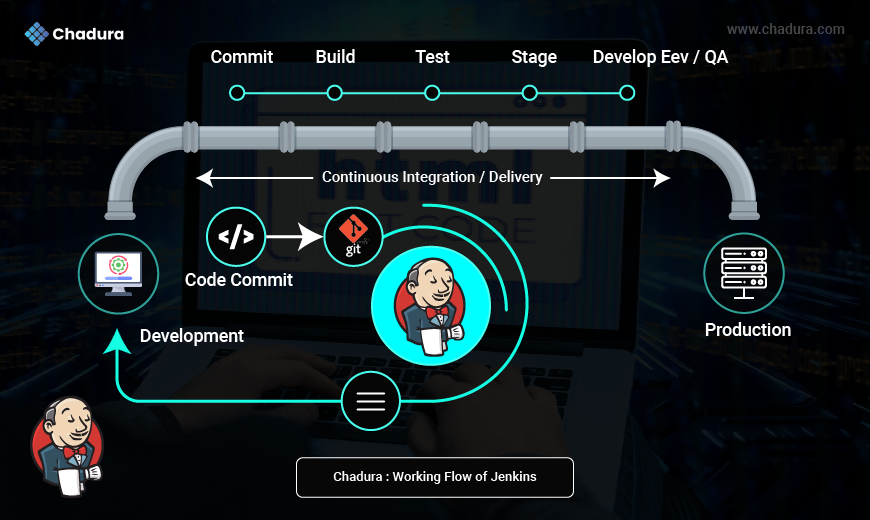
Working flow of Jenkins
Development
- Developers write code on their local machines.
- Once a feature or fix is ready, they commit the code.
Code Commit to Version Control
- The source code is pushed to a version control system, such as Git (as shown in the image).
- Jenkins is configured to monitor the Git repository for new commits.
Jenkins Trigger
When Jenkins detects a new commit:
- It triggers an automated pipeline.
- Jenkins acts as the central orchestrator of the CI/CD process.
Pipeline Stages
This is visualized as a pipeline above Jenkins, showing multiple stages:
- Commit - Code is committed to the repository.
- Build - Jenkins compiles the code and creates artifacts (e.g., JAR, WAR files).
- Test - Automated testing (unit tests, integration tests) is performed.
- Stage - The code is deployed to a staging environment.
- Deploy (Dev/QA) - Further deployments can be triggered to development or QA environments for validation.
Production - Final stage where the application is deployed to the live/production environment.
Continuous Integration / Delivery (CI / CD)
- The horizontal arrow labeled "Continuous Integration/Delivery" emphasizes automation and speed.
- The goal is to integrate code continuously, test it automatically, and deliver updates frequently to production.
End-to-End Flow Summary
Developer commits code → Git detects and stores it → Jenkins triggers a pipeline → Code is built, tested, staged, and deployed → Final release is deployed to production servers
Real-World Use Cases
Enterprises
- Large-scale monorepos and microservices pipelines
- Complex approval workflows with stages
Startups
- Use Jenkins for building, testing, deploying MVPs
- Docker-based CI for cost-efficiency
Universities/Training
- Teach CI/CD practices using local Jenkins labs
DevSecOps Teams
- Integrate Jenkins with security tools like Snyk, Aqua, Checkmarx
Conclusion
Jenkins is more than just a CI tool - it's the engine that powers modern DevOps practices. While newer tools may offer flashier UIs or native cloud support, Jenkins remains unmatched in flexibility, community support, and extensibility.
Whether you’re building a mobile app, deploying microservices, or running ML workflows, Jenkins can be the glue that holds your DevOps pipeline together.