

Overview
To find or fix a suitable instance/server type for your Django project, :
you need to assess the performance needs of your project and match that with an appropriate instance/server. Here's a complete step-by-step guide:
- Understand Your Django Project Requirements
- Estimate Resource Requirements
- Use Monitoring Tools to Analyze
- Choose the Right AWS EC2 Instance Family
- Benchmark & Auto Scale
- Optimization Checklist
- Upgrade Only When Required
Step 1: Understand Your Django Project Requirements
Start by answering:
- How many concurrent users do you expect?
- Does your project serve static or dynamic content?
- Do you have heavy background tasks (e.g., Celery)?
- Are you using a relational database (PostgreSQL/MySQL)?
- Do you use external storage (S3, etc.)?
- Are you using Gunicorn + Nginx/Caddy + PostgreSQL + Redis?
Start by answering:
- How many concurrent users do you expect?
- Does your project serve static or dynamic content ?
- Do you have heavy background tasks (e.g., Celery)?
- Are you using a relational database (PostgreSQL/MySQL)?
- Do you use external storage (S3, etc.)?
- Are you using Gunicorn + Nginx/Caddy + PostgreSQL + Redis ?
Step 2: Estimate Resource Requirements
Typical baseline for a small Django app:
Reference:
- Small traffic (~100 users/day): t3a.small or t3a.medium
- Medium traffic (1000+ users/day): t3a.large or t3a.xlarge
- High traffic: use c6g, m6i , or r6g depending on workload
Step 3: Use Monitoring Tools to Analyze
Step 4: Choose the Right AWS EC2 Instance Family
Tip: Use t3a.medium or t3.medium for most dev/staging Django apps.
Step 5: Benchmark & Auto Scale
Use ab or wrk to simulate load:
ab -n 1000 -c 50 http://yourdomain.com/
- Monitor with CloudWatch (AWS) or Netdata.
- Set auto-scaling groups if on AWS and expecting variable traffic.
Step 6: Optimization Checklist
Use Gunicorn with 2 - 4 workers per core:
gunicorn --workers 4 --threads 2 app.wsgi- Use PostgreSQL managed service like RDS.
Use Redis for caching and Celery tasks.
- Serve static files from S3 or CDN.
- Use Nginx or Caddy in front of Gunicorn.
Step 7: Upgrade Only When Required
If:
- CPU consistently > 70%
- RAM usage near 100%
- DB queries slow
- High response latency
Then upgrade to:
- More vCPUs
- More RAM
- Managed services (RDS, ElastiCache)
Understanding Cores, Threads, Workers, and Gunicorn Sockets in Django Deployment
When deploying a Django project to production, understanding system resources and optimizing your application server like Gunicorn is crucial for performance and scalability. In this blog, we’ll explore the key concepts of CPU cores, threads, Gunicorn workers, and sockets, and how they tie into Django deployment.
What Are CPU Cores?
A CPU core is an independent processing unit within the CPU that can execute instructions. In older computers, a CPU had just one core. Today, most CPUs have multiple cores - 4, 8, 12, or even more.
Each core can execute one task at a time independently. So, if your server has 4 cores, it can run 4 processes at once.
Benefits of multiple cores:
- Handle more simultaneous users
- Reduce response times
- Improve parallel processing
What is a Core?
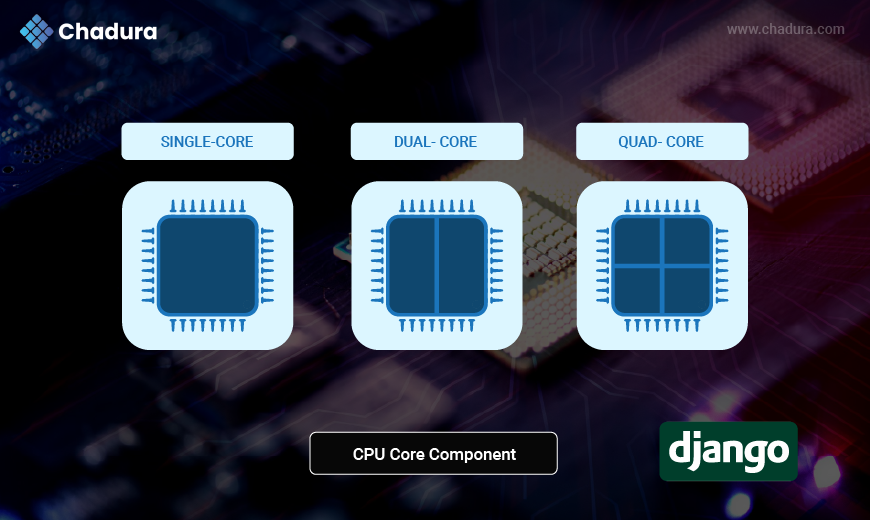
A CPU core is the primary computing unit of a processor. It executes instructions like calculations and code processing.
- A single-core CPU can handle one task at a time.
- A multi-core CPU (e.g., 4 cores) can handle multiple tasks simultaneously - one per core.
Example:
If your server has a 4-core processor, it can run 4 processes at the same time, independently.
What is a Thread?
A thread is a subdivision of a process. Each core can manage multiple threads through a technique called Hyper-Threading (Intel) or SMT (Simultaneous MultiThreading).
- A 4-core, 8-thread CPU can handle 8 threads concurrently (2 per core).
- Threads share the same memory space but can perform independent tasks.
Use Case:
In I/O-heavy applications like web servers, threads help improve performance by handling multiple requests in parallel.
What Are Gunicorn Workers?
Gunicorn is a Python WSGI HTTP Server used to serve Django applications.
- A worker is a process spawned by Gunicorn to handle incoming web requests.
- Gunicorn can run multiple workers to handle concurrent requests efficiently.
Types of Gunicorn Workers:
- sync (default) - One request per worker at a time (good for CPU-bound tasks).
- gevent / eventlet - Asynchronous workers, better for I/O-bound tasks.
- uvicorn.workers.UvicornWorker - For async Django or FastAPI apps.
Common Formula to set Worker Count:
workers = 2 * cores + 1This formula ensures your app can handle concurrent requests without overloading your CPU.
What is Gunicorn?
Gunicorn (Green Unicorn) is a Python WSGI HTTP Server for UNIX. It serves Python web apps, including Django, Flask, and FastAPI. Gunicorn runs your Django app in one or more worker processes, which allows it to handle multiple simultaneous client requests
What is Gunicorn Socket (gunicorn.sock)?
Instead of running a Gunicorn server on a TCP port (like 127.0.0.1:8000), you can run it on a Unix socket file (gunicorn.sock).
Benefits:
- Faster communication between Gunicorn and reverse proxies like Nginx or Caddy.
- Better security (doesn’t expose a public port).
- Efficient resource usage.
Example Gunicorn command using socket:
gunicorn yourproject.wsgi:application \\
--workers 3 \\
--bind unix:/run/gunicorn.sockAll Connects in a Django Project
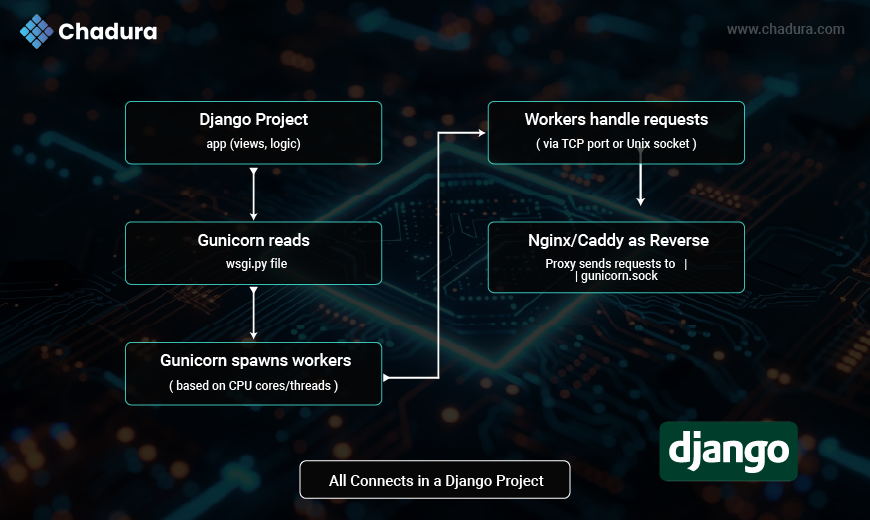
Workers in Gunicorn Explained
What is a Worker?
A worker is a Gunicorn process that handles one or more client requests. Each worker is independent and has its own Python interpreter, memory space, and resources.
Types of Gunicorn Workers:
sync (default) - Handles one request per worker.
gevent - Async I/O, suitable for real-time apps.
eventlet - Similar to gevent, but lighter.
tornado - Scalable non-blocking server.
gthread - Thread-based worker.
uvicorn.workers.UvicornWorker - For ASGI-based apps like FastAPI or async Django.
Gunicorn Configuration sample life:
workers = 4
threads = 2
timeout = 120
bind = 'unix:/run/gunicorn.sock'
loglevel = 'info'
accesslog = '/var/log/gunicorn/access.log'
errorlog = '/var/log/gunicorn/error.log'How Many Workers Should You Use?
Use this rule of thumb:
workers = 2 * cores + 1This provides a balance between CPU usage and concurrency.
Example: For a server with 4 cores:
workers = 2 * 4 + 1 = 9More workers = better concurrency but higher memory use.
Role of Threads in Gunicorn
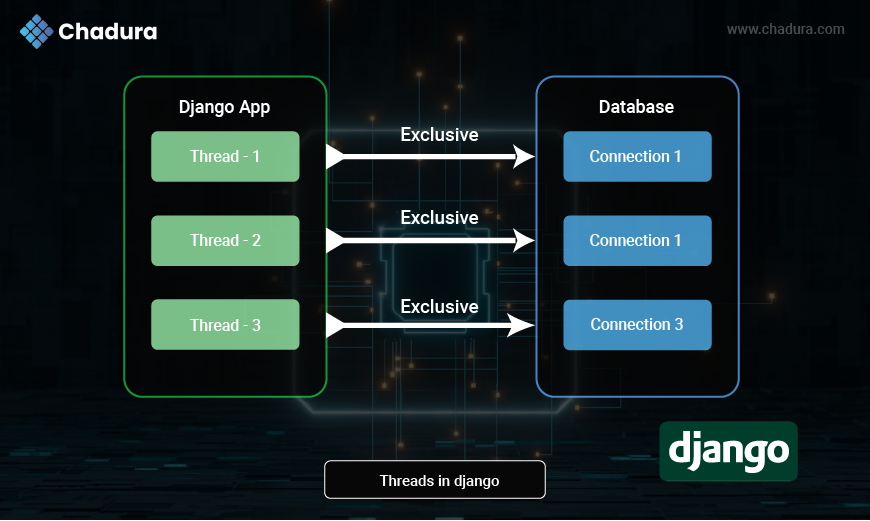
Threads vs Workers
- Worker = full process with memory overhead
- Thread = lightweight, inside a worker
Use threads when:
- Your app is I/O-bound (e.g., DB calls, APIs)
- You want fewer worker processes but more concurrency
Gunicorn supports:
--threads 4This makes each worker spawn 4 threads.
Combined Example:
gunicorn app.wsgi:application --workers 3 --threads 4Real-World Deployment Strategy
Scenario: 4-Core, 8-Thread CPU
Specifications:
- CPU: 4 Cores, 8 Threads
- RAM: 8 GB
- OS: Ubuntu 22.04
Ideal Gunicorn Setup:
- Workers: 9 (2 * 4 + 1)
- Threads: 2 (based on I/O load)
- Bind: Unix socket
gunicorn app.wsgi:application \\
--workers 9 \\
--threads 2 \\
--bind unix:/run/gunicorn.sockNginx or Caddy + Gunicorn
Use Nginx or Caddy as a reverse proxy.
Benefits:
- Serve static files efficiently
- SSL termination (HTTPS)
- Load balancing
- HTTP compression and caching
Sample Nginx :
server {
    listen 80;
    server_name example.com;
    location / {
    proxy_pass http://unix:/run/gunicorn.sock;
    proxy_set_header Host $host;
    proxy_set_header X-Real-IP $remote_addr;
       }
}Conclusion
Django’s performance in production heavily depends on how well you manage system-level configurations, especially CPU cores, threads, Gunicorn workers, and sockets.